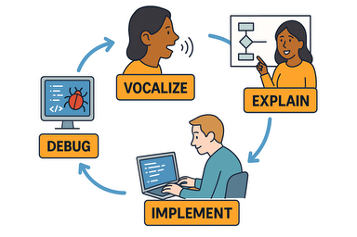
During our in-class activities, you will be paired with another student. When completing the activity, you will rotate between the following roles:
- Coder – Proposes solution strategies
- Computer – Processes solution strategy
The strategy relies on the code “vocalizing” their ideas and “explaining” them to the computer. The computer can ask questions, but will ultimately “implement” the coder’s instructions. Then they either move forward or “debug” their work.
Here are more details for how each role should engage with the task and each other through each step of the process:
Be curious, but don’t correct. Listen to the Coder read the prompt and ensure that everyone understands. Listens carefully, asks the Coder to repeat statements if needed, or to slow down. Do not give hints to the Coder for how to solve the problem. Do not solve the problem yourself. |
Encourages the Coder to vocalize their thinking. Asks the Coder clarifying questions, but does not offer their own view. Ask the Coder about what comments to make in the notebook to help the team understand the code later. |
|
If code does not run or has errors, asks the Coder questions about how to debug the proposed solution strategy. Once code runs, ask the Coder to evaluate the output relative to the prompt to ensure the output addresses the question. Do not tell the Coder how to correct an error. |
Questions
What are you focusing on? What are you thinking now? Do you understand what we need to do? What other sources of information do we need? Which functions should we look up? |
Questions
|
Questions
|
Questions
Why do you think the code didn’t /did work? What do you think the error message indicates? What’s the question we have for the instructor? Can we answer the question ourselves? What else do we need to complete this problem? |
Reads out loud instructions or prompts. Share with the Computer about ideas related to ways they could solve the problem. If needed, remind the Computer that they are the one to vocalize now. Manages resources (e.g., cheatsheets, textbook) for aiding in solution strategy. Do not ask the Computer how they would solve the problem. Do not ask the Computer what functions / tools they should use. |
If needed, remind the Computer that they are the one to vocalize now. Share with the Computer their thought process. Talks with Computer about what comments to make in the notebook to help the group understand the code later. |
|
Revises solution strategy based on evaluation / debugging conversations with the Computer. Tells the Computer about what comments to update in the notebook to help the group understand the code later. Do not ask the Computer to debug the code. |
Statements
|
Statements
I think this will work because… I chose this approach because… I wonder what happens if we… If we run this, I expect it to… The comments we should include are… |
Statements
Start with… The arguments to the function should be… I think the correct syntax is… I think the correct variable name is… |
Statements
|
In addition to the above protocol, remember the following:
Team Norms
- Be curious. Don’t correct.
- Be open minded.
- Ask questions rather than contribute.
- Respect each other.
- Allow each teammate to contribute to the activity through their role.
- Do not divide the work.
- No cross talk with other groups.
- Communicate with each other!
Completing the Task
Working with your partner, complete the Activity in the notebook provided. In your roles—Coder and Computer—use the prompts above to help guide the completion of your activity.
Once You’re Finished
At the end of the task, your group will have one completed notebook, containing your team’s worked-out solutions and justifications. Everyone must take turns writing the final product (as described above) and everyone must be able to explain every line of code in your final document. Your activity will be submitted to the group assignment.